ERAS PREVIEW / WHAT THE SOURCES ESTABLISH
Does the ERAS headshot preview show what programs see?
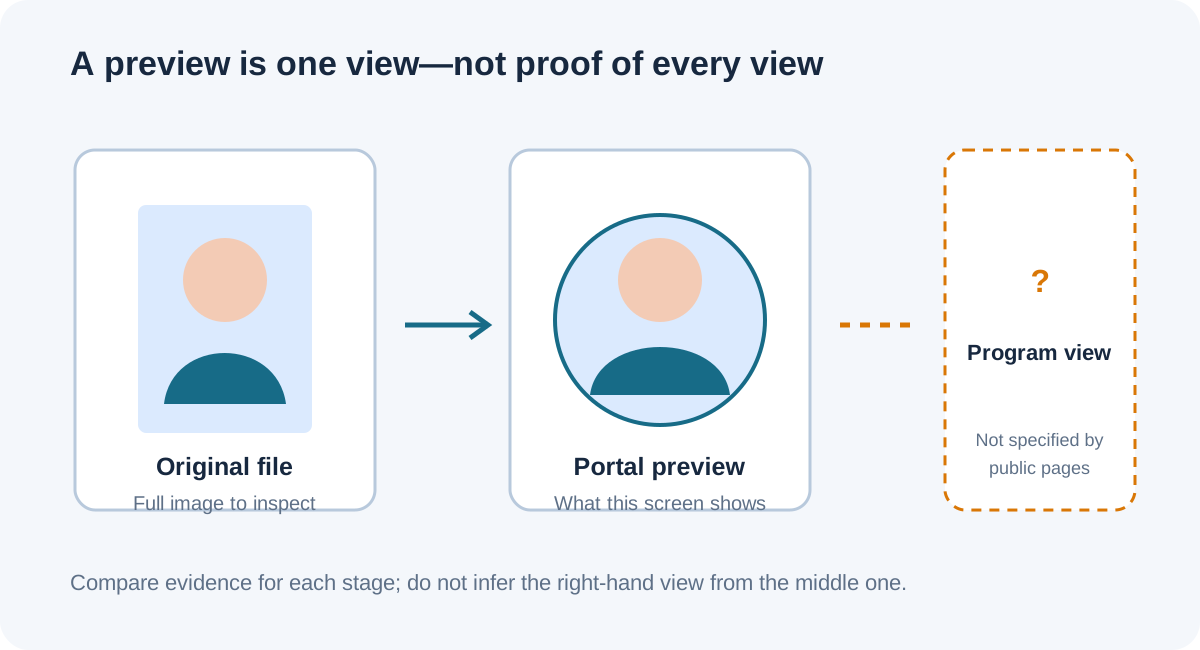
A circular or cropped preview alone does not establish what a residency program sees. The official public photo instructions specify file and framing requirements, but the pages reviewed do not explain whether every program-facing view uses the preview crop or the full uploaded image. Keep the original file, check the route-specific requirements, and ask the relevant ERAS support team about a specific preview discrepancy instead of guessing from the shape on screen.
What the public instructions do—and do not—say
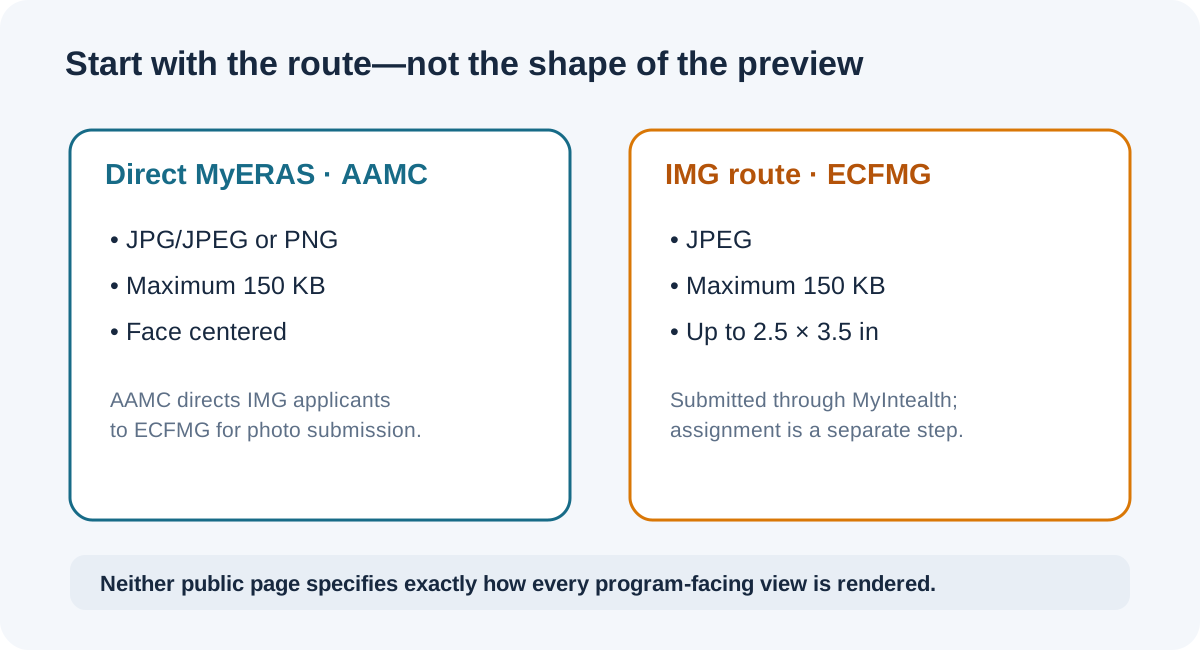
The AAMC photo page tells U.S. medical school graduates to upload a photo in MyERAS and lists JPG/JPEG or PNG, a 150 KB maximum, and a centered face. It directs international medical graduates to ECFMG for photo submission information. ECFMG’s current supporting-documents page describes the MyIntealth route, says a photo is used by programs to identify an applicant at interview and as a memory aid for a rank-order list, and provides separate JPEG, file-size, dimension, submission, and assignment steps. Neither public instruction page explains the exact rendering of every program-facing view or says that a circle in an applicant preview is identical to what each program sees.
That distinction matters: a displayed crop is evidence about that display, while the original uploaded file is evidence about the full image. Neither one, by itself, answers how a separate downstream screen renders it. This page has not accessed MyERAS, MyIntealth, or a program account, and does not claim to know the private interface or reviewer view.
A source-first check for a preview that looks cropped
Use this sequence to separate a confirmed file issue from a question the preview cannot settle:
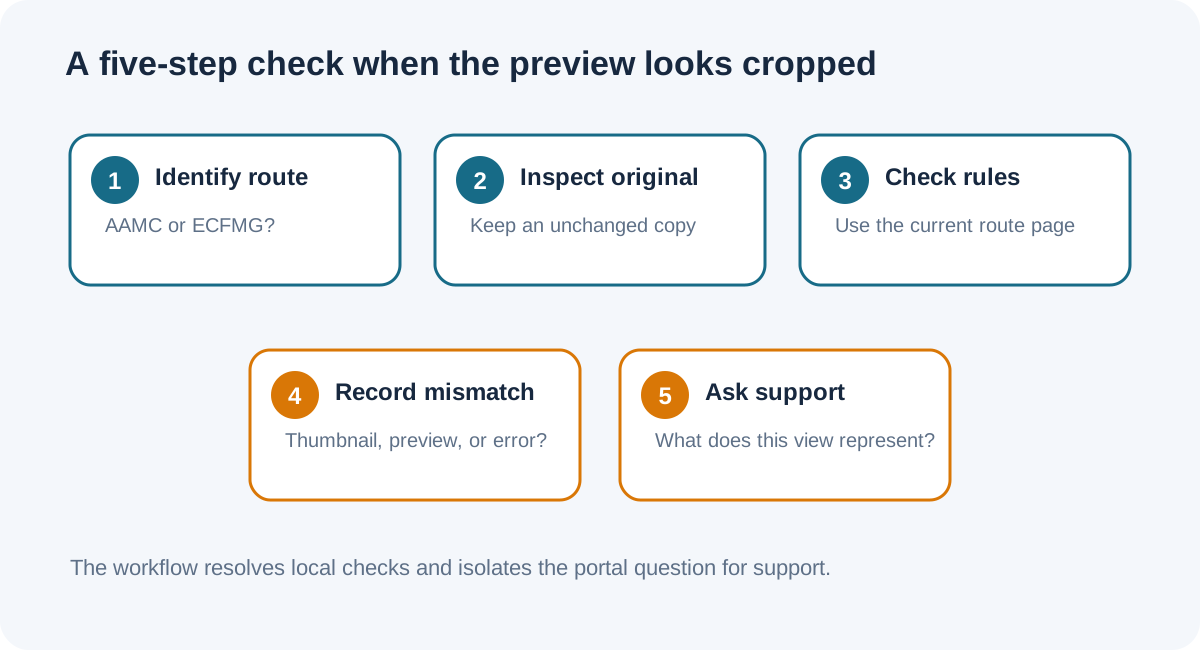
- Identify the submission route. If you submit directly as a U.S. medical school graduate, start with AAMC’s current MyERAS photo page. If you submit through ECFMG, use the current MyIntealth instructions. Do not transfer a limit from one route to the other without checking the matching source.
- Open the exact local upload file. Check that it is the file you intended to upload and inspect the whole image in a normal image viewer. Keep an unchanged copy. This verifies the source file, not the portal’s rendering.
- Check the listed requirements. For direct MyERAS, the AAMC page lists JPG/JPEG or PNG, up to 150 KB, and a centered face. For the ECFMG route, its page lists JPEG, up to 150 KB, and dimensions no larger than 2.5 × 3.5 inches. Follow the latest route-specific page if it changes.
- Record the discrepancy precisely. Note whether the problem is a circular thumbnail, a larger preview, a visibly altered uploaded file, or a rejection message. Avoid treating those as the same event. A screenshot of the display and the original file can help support identify which stage is involved.
- Ask the route’s support team what that view represents. The public instructions reviewed here do not settle whether the circle is the program-facing image. Ask that exact question before changing or replacing a file based only on an uncertain preview. Do not email a photo to ECFMG; its page says not to email the photograph.
This is a verification workflow derived from the official route instructions and the limits of the public evidence. It does not guarantee how a portal or any individual program will display a photo.
Common questions
If the circle cuts off the top of my head, does that prove the uploaded photo is cropped?
No. It proves what that circle preview displays. Open the exact uploaded source separately and compare it. The preview may be a crop of the display, but the public instructions do not establish that the original file has been altered or define every downstream display.
Do programs see the full image or the circle?
The public AAMC and ECFMG photo instruction pages reviewed do not answer that exact interface question. ECFMG says programs use the photo for identification and as a memory aid, but does not specify the shape or crop of each screen. Ask the relevant support team about the specific view.
Should I upload a square crop because the preview is round?
Do not infer a file-shape requirement from a circular preview. Follow the current requirements for your submission route and check the entire uploaded file. AAMC’s page says the face should be centered; ECFMG gives its own technical limits.
Can I email ECFMG the photo to ask them to inspect it?
ECFMG’s supporting-documents page says not to email the photograph and says it cannot modify applicants’ files. Use its published MyIntealth and support route for a question about your submission.
Sources and scope
- AAMC, Photo — direct MyERAS route, file type/size, and centered-face requirement.
- ECFMG, ERAS Supporting Documents: Photograph — IMG route, specifications, use, transmission, assignment, and no-email instruction.
- Applicant question, “ERAS photo cropped in preview?” — a recent example of uncertainty about whether a circular preview matches a program-facing view. Replies conflict and are not official evidence.
- Applicant question about the 2.5 × 3.5-inch photo requirement — a recent route-instruction ambiguity signal, not an official interpretation.
Official pages checked October 8, 2026. The applicant posts establish that people ask these questions; they do not establish how programs see a photograph. This independent site is not affiliated with AAMC, ECFMG, Intealth, or ERAS Support Services.
Watch the companion video
Video production is in progress.