FILE HANDOFF / ERAS HEADSHOT
What to check in an ERAS headshot from your photographer
Ask for the finished image as a normal downloadable file, then verify the file itself against the instructions for your application route. The AAMC’s direct MyERAS route lists JPG/JPEG or PNG and a 150 KB maximum. ECFMG’s IMG route specifies JPEG, a 150 KB maximum, and a maximum physical size of 2.5 by 3.5 inches. Keep the photographer’s full-quality master separate from the upload copy, and do not use an email preview or filename as proof of the file’s contents.
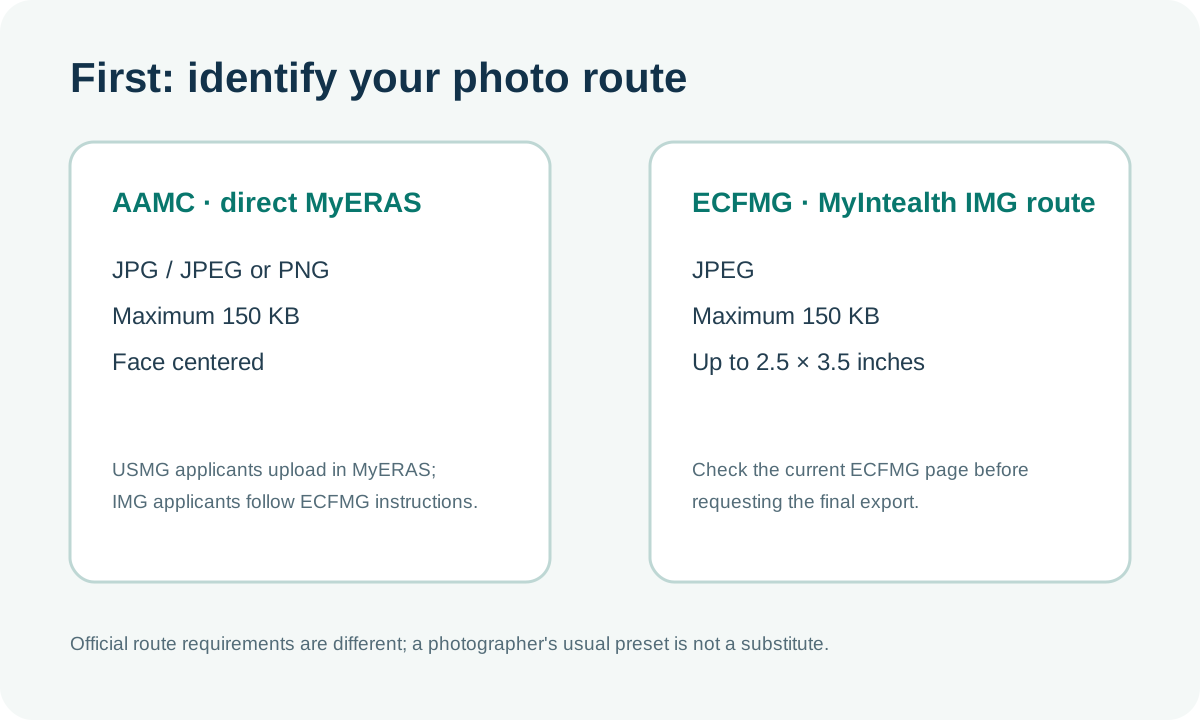
Confirm which photo route applies
For U.S. medical school graduates using direct MyERAS photo upload, the AAMC Photo page lists JPG/JPEG or PNG, a maximum file size of 150 KB, and a centered face. It says IMG applicants should follow ECFMG’s photo-submission instructions. ECFMG’s ERAS supporting-documents page says to submit the IMG photograph through MyIntealth as a JPEG, no larger than 150 KB and no larger than 2.5 by 3.5 inches.
These are different route instructions. Do not ask a photographer for a format based on someone else’s checklist or assume that a studio’s standard export is already the file your route requires. Recheck the official page for the current application season before sending a final export. The AAMC page does not list a pixel-dimension minimum in its photo bullets; do not turn print resolution or a photographer’s preset into an extra MyERAS rule.
What to request with the delivery
A short, specific request helps separate the portrait from the file that will be uploaded. Ask the photographer to identify the final edited image clearly and deliver it as an attached or downloadable image file. If the service includes several crops or exports, ask which exact file was prepared for your route and what was changed between versions.
- Name the route. Say whether you are following the AAMC’s direct MyERAS photo instructions or ECFMG’s MyIntealth instructions. If you are unsure, resolve that before requesting a format.
- Ask for the final file itself. A screenshot of an email, a contact sheet, a preview in a messaging app, or a link to a gallery is not the same thing as the exact export you intend to check.
- Keep two versions separate when available. Preserve the full-quality edited master for your records. Put any smaller route-specific export in a separate folder and give it an unmistakable filename, such as
eras-photo-final.jpg. The name is a label, not a validation result. - Request the export details. Ask for the actual format, pixel dimensions, and file size shown for the delivered copy. For the ECFMG route, also ask whether the delivered file’s physical dimensions meet the published maximum; a print-size statement alone does not verify the image data.
- Review the crop at normal size. Open the received file and confirm that the face is centered and the head-and-shoulders framing looks as intended. Do not infer how an application portal will render a preview from the photographer’s software.
- Ask for a revised export if a check fails. Tell the photographer which route-specific check failed and request a new copy. Keep the original and the new export separate so you can compare them.
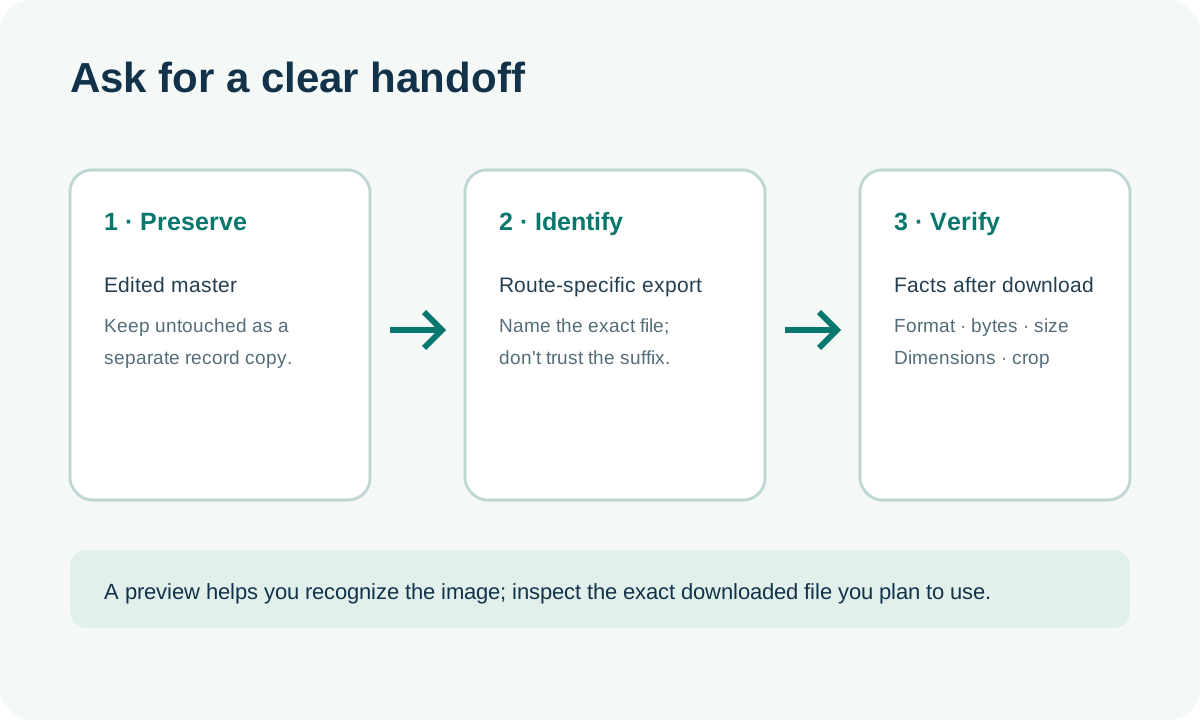
This checklist is a file-review method, not a claim about what a photo studio must include in a service. Follow the terms of your own session and ask for only the exports or revisions included in that arrangement.
Three synthetic handoff files, checked locally
To test what a basic handoff review can catch, we generated three geometric test cards with no person in them. A script reopened each file with Pillow 12.3.0, checked the detected encoding, read the exact byte count and pixel dimensions, verified that the file decoded, and compared its detected format with the filename extension. We used 150,000 decimal bytes as an explicit comparison reference in this small test; the official pages say “150 KB” and do not define the byte conversion in those bullets.
| Synthetic file | Detected format | Bytes | Pixels | Basic check result |
|---|---|---|---|---|
| delivery-final.jpg | JPEG | 24,507 | 600 × 840 | Decoded; extension matches; below the stated byte reference |
| mislabeled-jpeg.jpg | PNG | 1,649 | 360 × 504 | Decoded; filename extension does not match detected format |
| oversize-export.jpg | JPEG | 992,399 | 1,200 × 1,680 | Decoded; above the stated byte reference |
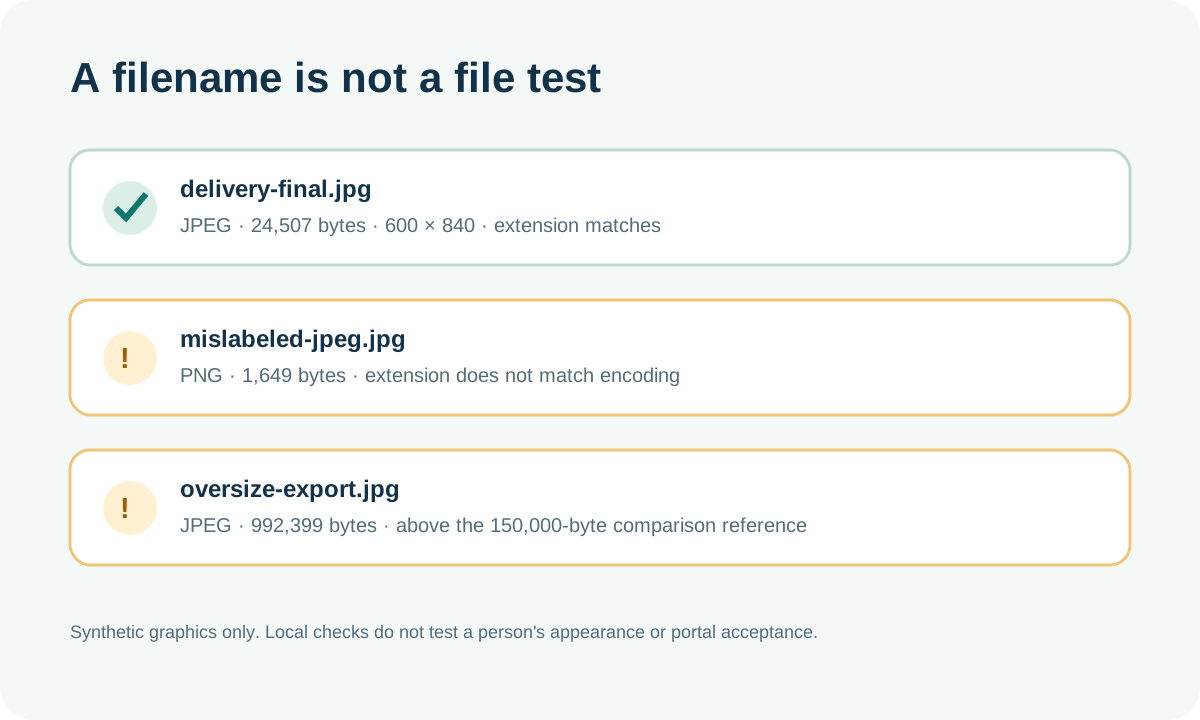
The first file passed these limited local checks. The second shows why changing a suffix cannot convert image data. The third was a valid JPEG but was much larger than the comparison reference. None is a photograph, none was uploaded to MyERAS or MyIntealth, and the test does not establish a person’s framing, visual quality, application eligibility, or portal acceptance.
The result also illustrates why “the file opens” is not a complete review: all three files decoded, yet one had a format/name mismatch and another exceeded the test reference. Conversely, matching the extension and falling below the byte reference still does not verify every route requirement. Read the route’s current specification and open the exact final file.
A repeatable receive-and-check workflow
Use the same sequence every time a photographer sends a revised export. It keeps inspection separate from editing and makes it easier to identify which copy you actually reviewed.
- Save a fresh copy. Download the delivered file into a new folder without overwriting the master or an earlier version. Keep the photographer’s original filename in your notes.
- Check the detected format. Use an image viewer or file-inspection tool that reads the encoded format. A “.jpg” ending alone only tells you what the file is named.
- Read the exact byte count. Compare it with the current official maximum for your route. If a file is near the limit, do not assume that two systems interpret “KB” the same way; use the official portal’s own result as the final check.
- Check the dimensions that the route actually specifies. Pixel width and height are not interchangeable with physical inches. For ECFMG, check the published physical-size limit as well as format and size; for AAMC direct upload, its photo bullets do not publish a pixel-dimension requirement.
- Open the exact export and inspect the crop. Check the visible file at a normal viewing size, confirm the centered-face guidance where it applies, and compare it with the version you approved. A local review cannot predict a portal preview.
- Record the version. Keep its filename, format, pixel dimensions, byte count, and any response from the photographer together. If you request another export, repeat the checks instead of assuming only one property changed.
Figure 2’s handoff note and the downloadable test bundle can be reused as a simple record. The bundle includes the three synthetic files, exact measurements, and the reproduction script. It contains no real applicant portrait.
Common delivery questions
Is a photographer’s email preview enough?
No. It can help you recognize the image, but it may not expose the exact encoded format, saved byte count, or dimensions of the attachment you will use. Download and inspect the actual final file.
Should I request PNG or JPEG?
Use the route’s current official instructions. The AAMC direct MyERAS page lists JPG/JPEG or PNG; ECFMG’s MyIntealth photograph instructions specify JPEG for the IMG route.
Does a small file prove the portrait is ready?
No. A byte count is one file check. It does not establish the correct route, file format, physical dimensions where required, centered framing, or portal acceptance.
Does the photographer need to deliver 2.5 by 3.5 inches?
That maximum appears in ECFMG’s MyIntealth photograph specifications. The current AAMC direct MyERAS photo bullets list format, file size, and a centered face; they do not list that physical-size limit in the same section. Confirm your route before requesting a crop.
Watch the file-handoff walkthrough
This video walks through the three synthetic file checks with English narration and captions. It does not show a real applicant portrait or an application-portal upload.
Watch ERAS Headshot Photographer Delivery: What to Check on YouTube
Sources and reproducible files
- AAMC, Photo — direct MyERAS file types, maximum file size, centered-face guidance, and the route distinction for IMGs.
- ECFMG, ERAS Supporting Documents — Photograph — MyIntealth format, size, and physical dimensions.
- Public applicant question about a cropped circular preview — used only to identify a confusing handoff/preview question, not as evidence about portal behavior.
- Download the three synthetic files, measurements, and reproduction script · Read the exact test results.
Independent file checks run September 30, 2026 with Pillow 12.3.0. This site is not affiliated with the AAMC or ECFMG.