TOOL TEST / ERAS HEADSHOT
What Can an ERAS Headshot Checker Actually Verify?
A file checker can report properties of the selected image and estimate a few visible patterns, but it cannot confirm how MyERAS crops a preview or whether an application portal accepts a photo. In our reproducible test, a blank gray image with no face received a “Centered (estimated)” result, showing why pixel-based estimates need visual review.
Start with the current official route
The AAMC’s current MyERAS photo section lists JPG/JPEG or PNG, a 150 KB maximum, and a centered face. It also says the photo is most often used to help programs identify an applicant at an interview and advises applicants to check how individual programs use it. The section directs IMG applicants to ECFMG for photo-submission instructions.
Those published instructions do not describe this website’s pixel-sampling method, certify an automated centering score, or explain the circular-preview question raised in public applicant discussions. The checker’s extra technical values must therefore stay separate from the official list. The applicable MyERAS or ECFMG instructions remain the source for the upload route.
What the checker reads from a selected file
The checker runs in the browser. It reads the selected file’s byte size, decodes the image to obtain pixel width and height, and looks for DPI metadata in the JPEG JFIF or PNG pHYs data when present. It calculates a print-size estimate from pixel dimensions and embedded DPI. When no density metadata is found, it labels the 150-DPI assumption and the resulting print size as an estimate.
The format row is based on the browser-provided MIME type or the filename extension and the browser’s ability to load the image. It is not a byte-for-byte file-signature audit. The checker also does not submit the photo to MyERAS, ECFMG, or this website’s server. The browser displays the chosen image locally for its checks.
| Output | How it is obtained | What it does not establish |
|---|---|---|
| File size | Browser File API byte count, displayed in KB | Portal acceptance at an unspecified byte boundary |
| Pixel dimensions | Width and height after the browser decodes the image | That a particular dimension is an AAMC rule |
| DPI | Embedded JPEG/PNG density metadata, when available | Visible sharpness or a current AAMC DPI requirement |
| Print-size value | Pixel count divided by embedded DPI, or an explicitly labeled assumed value | Physical print quality or application acceptance |
| Format label | Browser MIME type or filename extension plus successful image decoding | A cryptographic or full file-signature verification |
Three no-face files put the estimates to the test
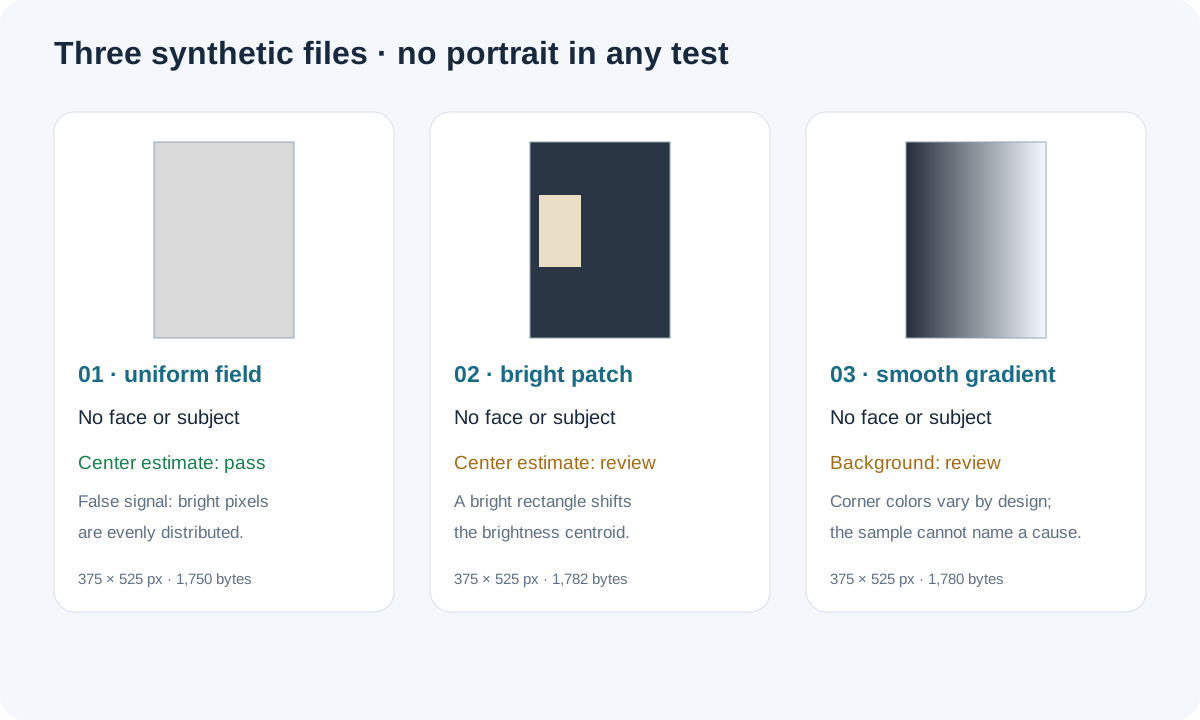
To separate a centering estimate from actual face detection, we generated three deterministic 375 × 525 pixel RGB PNG files with no person, face, or portrait detail. Each file carries 150-DPI metadata and is far below the published AAMC size maximum. We opened each file in the site’s actual checker in a local Chrome preview and recorded all seven visible result rows. We did not upload the test files to an application portal.
| Test image | File facts shown | Background estimate | Centering estimate |
|---|---|---|---|
| Uniform gray field | 375 × 525 px · 1,750 bytes | Solid · Pass | Centered, −0.2% / −0.2% · Pass |
| Dark field with off-center bright rectangle | 375 × 525 px · 1,782 bytes | Solid · Pass | Off-center, −28.5% / −4.2% · Review |
| Left-to-right color gradient | 375 × 525 px · 1,780 bytes | Not solid · Review | Off-center, +19.8% / −0.2% · Review |
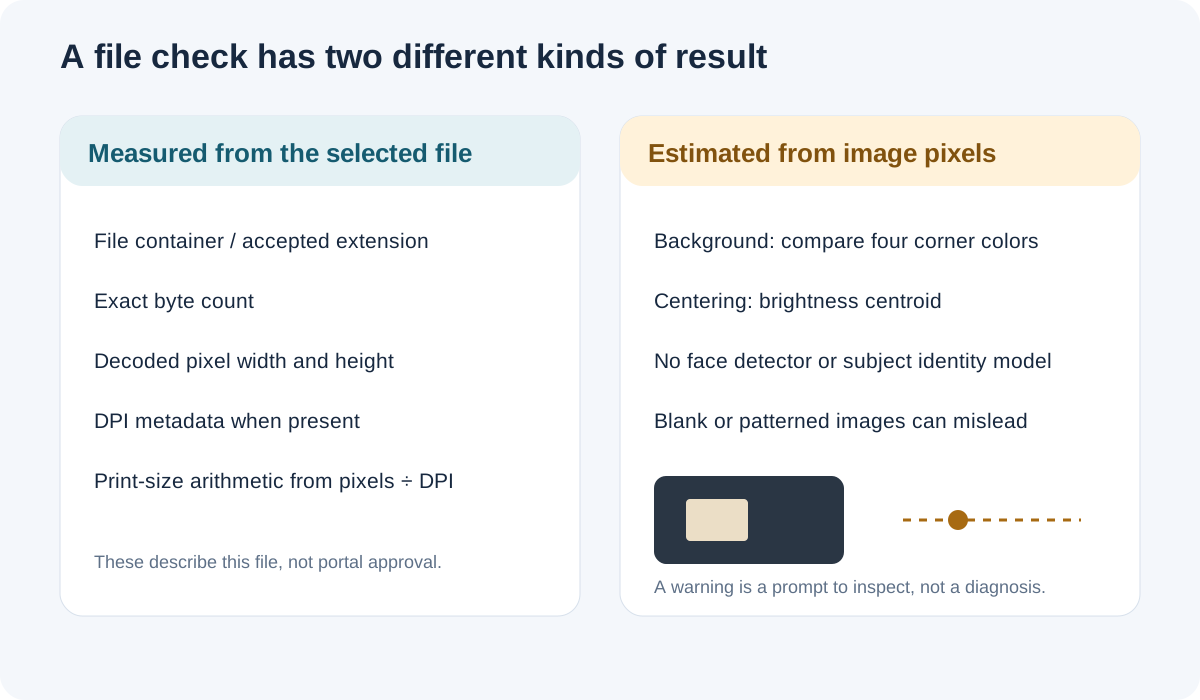
The first result is the clearest boundary: an entirely blank image received the checker’s centered estimate because bright pixels were evenly distributed. The second had uniformly dark corners, so the background estimate passed, while a light rectangle shifted the brightness centroid. The gradient changed the sampled corner colors and shifted the same centroid in the opposite direction. None of these outcomes measures face location; the experiment demonstrates what the implemented calculation responds to.
The background scan also has a narrow scope. It downsizes the image, samples four corner regions, and compares their average colors. Uniform corners can coexist with an object or shadow elsewhere; differing corners can come from a gradient rather than clutter. The score cannot identify the cause or classify a background as acceptable.
A repeatable way to read a checker result
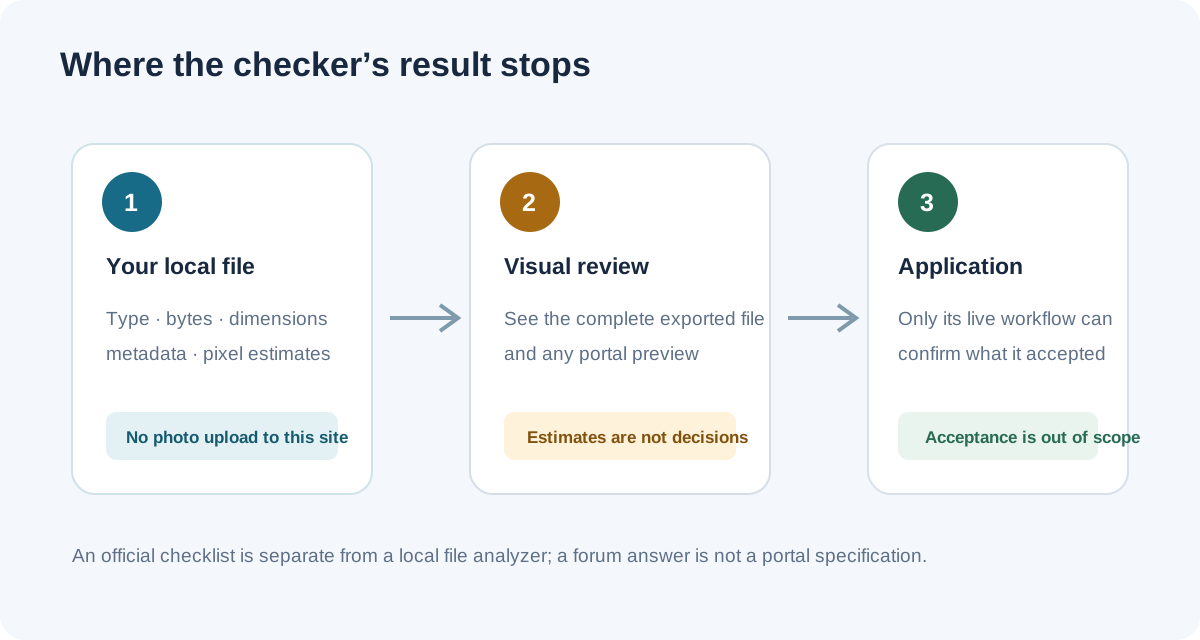
Our test supports a simple separation of evidence. Keep the exact-file observations together, and treat pixel heuristics as prompts rather than face-recognition results. That distinction prevents a reassuring badge from being read as a portal decision.
- Record the file facts. Note the actual decoded dimensions, displayed byte size, and any metadata the checker says it found. If the format matters, open the downloaded copy in an image viewer or file inspector; a name ending in “.jpg” alone is not a complete format audit.
- Read the estimate label. A centered or solid result describes this checker’s color calculation. It does not mean the software found a face or recognized a clean background.
- Inspect the full exported image. Compare the saved copy—not only an in-page thumbnail—with the original. The checker cannot reason about a forehead, shoulder, expression, blur, or a portal’s crop.
- Keep portal questions portal-specific. A recent public applicant thread asks whether a circular preview and the opened photo show the same image area. The thread records a question and mixed personal replies; it does not establish what every reviewer or portal displays. Check the instructions for the application route instead of treating a forum comment or local score as confirmation.
This method is based on three synthetic-image tests and a review of the checker implementation. It is not a statistical accuracy study: no real portraits were processed, no face-detection benchmark was run, and no MyERAS or ECFMG preview was tested.
What this test cannot verify
- Whether a real face is present, centered, identifiable, or unobstructed.
- Whether the background is plain, professional, or appropriate for a specific program.
- Whether a circular preview, opened image, or downloaded image will look the same in a particular portal.
- Whether MyERAS, ECFMG, or a residency program accepted or will use a particular file.
The test only checks how this site’s current browser-side implementation responded to three controlled images. A “Pass” on an estimate is not an application result.
Common checker questions
Does “All checks passed” mean MyERAS accepted the picture?
No. It means this local checker returned no warning on the measured file values and its own estimates. It does not connect to MyERAS or confirm upload status.
Does a centered result mean the tool detected my face?
No. Its estimate uses the brightness-weighted center of pixels above a threshold. The uniform no-face test received a centered result, which shows that brightness distribution and face location are different signals.
Why can a background estimate disagree with what I see?
The method compares colors in four small corner regions. It does not label objects or understand the scene. A shadow or gradient can change corner values, while a distracting object away from the corners can leave them unchanged.
Does the tool upload my photo?
The checker reads and processes the selected image in your browser. It does not send the photo to an application portal or the site’s server. You can use the photo checker or the file preparation tool to inspect a copy locally.
Watch the three-image checker test
This video follows the article test using three synthetic, face-free images and explains why file facts must be separated from pixel-based estimates. It includes English narration and captions; no real portrait or application-portal upload was tested.
Watch What Can an ERAS Headshot Checker Actually Verify? on YouTube
Sources and reproducible test files
- AAMC, Photo — 2027 MyERAS Applicant User Guide (current route and listed photo requirements).
- ECFMG, ERAS supporting documents (IMG applicant photo-submission route).
- A public applicant thread asking whether a circular preview and opened image show the same area; used only to document the question, not as platform policy.
- Download the three no-face test PNGs, measurements, and reproduction script · Read test file measurements.
Test run September 29, 2026 in local Chrome against this site’s checker. All sample images are synthetic and contain no person. The results test the tool’s behavior, not applicant photos or portal outcomes. This independent website is not affiliated with AAMC, ERAS, or ECFMG.